
← All integrations
 Shopify + SMSMobileAPI
Shopify + SMSMobileAPI
SMS AND WHATSAPP FOR SHOPIFY
Send Shopify notifications from your own number.
Turn Shopify order events into useful customer messages. Send SMS through your connected mobile phone and existing SIM number, or send WhatsApp messages through the account you link to SMSMobileAPI.
Your numberKeep the sender customers know
SMS + WhatsAppChoose one or both channels
Simple setupConnect, configure and test
SHOPIFY EVENTOrder #1048 paid
NOW
Customer · Alex Morgan
automatic trigger

ROUTED BYSMSMobileAPITemplate + order data + selected channel
FROM ORDER TO CUSTOMER
Four simple steps. No physical SMS gateway to install.
Connect the tools once, choose the messages that matter and let Shopify events trigger the communication automatically.
- 01
Connect Shopify
Authorize the store and link it to your SMSMobileAPI account.
- 02
Connect your channels
Pair a mobile for SMS and scan the QR code when you also want WhatsApp.
- 03
Choose events and messages
Enable the order states you need and personalize every template.
- 04
Test and activate
Send a controlled notification, then monitor live activity from the dashboard.
AUTOMATE THE IMPORTANT MOMENTS
Notify customers across the order lifecycle.
Use only the events that improve the customer experience. Each notification can include dynamic Shopify data such as the customer name, order reference, amount or fulfilment state.
Order created
Confirm that the order was received and show the customer its reference.
Payment confirmed
Reassure the customer immediately when payment succeeds.
Order fulfilled
Let the customer know that preparation is complete.
Shipping update
Send dispatch and delivery information at the right moment.
Refund or cancellation
Communicate important order changes clearly and quickly.
Pickup and follow-up
Send collection reminders or useful post-purchase information.
CONFIGURE WITHOUT CODE
Choose the event. Write the message. Save.
The Shopify integration gives you a clear configuration screen for enabling the order events you want to communicate. Dynamic placeholders insert useful customer and order information automatically.
MESSAGE TEMPLATE
Create your account
Hello {{customer_first_name}}, your order #{{order_id}} has been paid and is now being prepared.
SMS or WhatsApp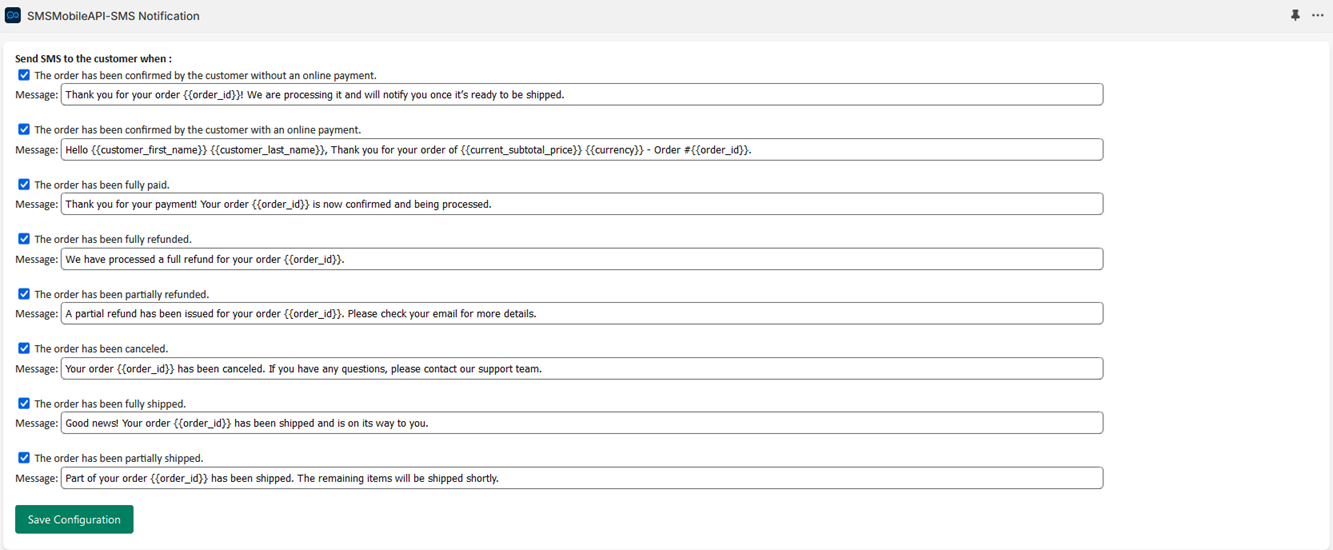
ONE CONTROL CENTER
Keep sending activity visible after automation starts.
Your store runs automatically, but you keep operational visibility. Review communication logs, connected devices and channel state from the SMSMobileAPI dashboard.
Open the dashboardOrder #1048SMS · Sent from your mobile
Order #1047WhatsApp · Delivered
Order #1046SMS · Waiting for device
BUILT FOR REAL STORES
Simple for the merchant. Familiar for the customer.
Keep your identity
Communicate from the mobile or WhatsApp number associated with your business instead of introducing an unrelated sender.
Start without development
Configure common order events and message templates from the integration interface.
Use order data
Personalize messages with customer and order variables already available in Shopify.
Stay observable
Use SMSMobileAPI logs and connection status to verify that automated communication is operating.
SHOPIFY INTEGRATION FAQ
Questions before connecting your store.
SMSMobileAPI separates the Shopify trigger from the communication channel, so you can choose how each customer notification should be delivered.
Does an SMS really use my own mobile number?
Yes. SMS sending is routed through a mobile phone connected to SMSMobileAPI, using that phone's SIM and mobile number. Your carrier plan and conditions still apply.
Can I use SMS and WhatsApp together?
Yes. You can configure the available channels according to the Shopify event and the communication workflow you want to provide.
How is WhatsApp connected?
Open WhatsApp Config in the SMSMobileAPI dashboard and scan the displayed QR code from the WhatsApp account you want to link.
Can messages contain Shopify order information?
Yes. Message templates can use supported customer and order variables so each notification contains the relevant context.
Do I need a physical SMS gateway?
No. The connected mobile phone and official SMSMobileAPI app provide the SMS communication bridge.
YOUR STORE. YOUR CHANNELS. YOUR NUMBER.
Connect Shopify to the mobile communication tools you already own.
Start with a controlled test, choose SMS, WhatsApp or both, and turn the right order events into clear customer communication.
