
← All integrations
 WooCommerce + SMSMobileAPI
Send store
WooCommerce + SMSMobileAPI
SMS AND WHATSAPP FOR WOOCOMMERCE
Send store
notifications
from your own number.
Turn WooCommerce orders into timely customer messages. Send SMS through your connected mobile phone and existing SIM number, or send WhatsApp through the account you connect to SMSMobileAPI.
Your numberKeep the sender your customers know
SMS + WhatsAppUse one channel or both
WordPress pluginInstall, connect and configure
WOOCOMMERCE EVENTOrder #5812 processing
NOW
Customer · Emma Taylor
automatic rule

ROUTED BYSMSMobileAPIOrder data + template + selected channel
FROM WORDPRESS TO THE CUSTOMER
Four simple steps. No physical SMS gateway.
Install the plugin, connect the channels you want and transform WooCommerce activity into automatic customer communication.
- 01
Install the plugin
Add the SMSMobileAPI integration to your WordPress and WooCommerce website.
- 02
Connect your channels
Pair your mobile for SMS and scan the QR code if you also want WhatsApp.
- 03
Create the rules
Select events, add conditions and write personalized message templates.
- 04
Test and activate
Place a controlled order, verify delivery and monitor future notifications.
AUTOMATE THE ORDER LIFECYCLE
Send the useful message at the right moment.
Choose only the WooCommerce events that improve the customer experience. Templates can include relevant customer, order, payment and fulfilment information.
New order
Confirm that the order was received and include its reference immediately.
Payment update
Notify the customer when payment succeeds, fails or requires attention.
Processing
Explain that preparation has started and set clear expectations.
Completed or shipped
Send dispatch, completion or delivery information automatically.
Cancelled or refunded
Communicate important changes quickly and reduce uncertainty.
Conditional alerts
Target messages by amount, location, product or supported order data.
RULES WITHOUT CUSTOM DEVELOPMENT
Choose the trigger. Add conditions. Write the message.
Create focused WooCommerce communication instead of sending every message to every customer. A rule can react to an order status and use supported order fields to decide when it should run.
EXAMPLE RULE
Create your account
When an order enters Processing and the delivery city matches the selected area, send the matching preparation message.
SMS, WhatsApp or both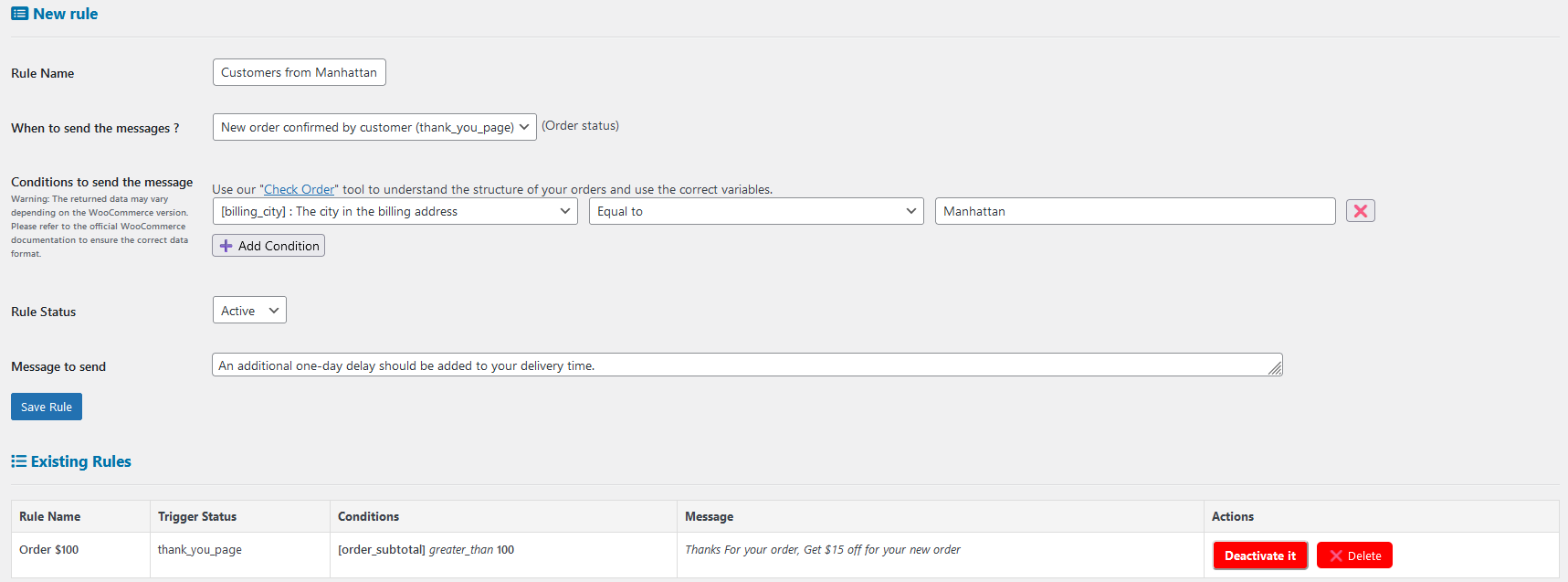
ONE CONTROL CENTER
Keep automated sending visible.
WooCommerce triggers the workflows, while SMSMobileAPI gives you visibility into connected devices, communication status and sending activity.
Open the dashboardOrder #5812SMS · Sent from your mobile
Order #5811WhatsApp · Delivered
Order #5810SMS · Waiting for device
BUILT FOR WOOCOMMERCE BUSINESSES
Flexible for the store. Familiar for the customer.
Keep your sender
Communicate from a mobile or WhatsApp number associated with your business.
Connect quickly
Use a WordPress plugin, your SMSMobileAPI account and the channels you need.
Build precise rules
Combine order events, conditions and dynamic data to make messages relevant.
Stay in control
Verify connected services and follow communication activity from the dashboard.
WOOCOMMERCE INTEGRATION FAQ
Questions before connecting your store.
The plugin turns WooCommerce events into communication requests while SMSMobileAPI controls the connected SMS and WhatsApp channels.
Does an SMS really use my own mobile number?
Yes. SMS are routed through a mobile phone connected to SMSMobileAPI, using that phone's SIM and mobile number. Carrier plan charges and conditions still apply.
Can WooCommerce use SMS and WhatsApp?
Yes. Connect your mobile for SMS, your WhatsApp account for WhatsApp, then select the channel or channels required by your notification workflow.
Can I control when a notification is sent?
Yes. Rules can use supported WooCommerce events and conditions so the appropriate message is sent only when its criteria are met.
Can messages contain order information?
Yes. Templates can use supported customer and order variables to add the context needed for each notification.
Do I need a physical SMS gateway?
No. Your connected mobile and the official SMSMobileAPI application provide the SMS communication bridge.
YOUR STORE. YOUR CHANNELS. YOUR NUMBER.
Connect WooCommerce to the communication tools you already own.
Start with a controlled test, choose SMS, WhatsApp or both, and automate the order moments that matter to your customers.
