

参考截图
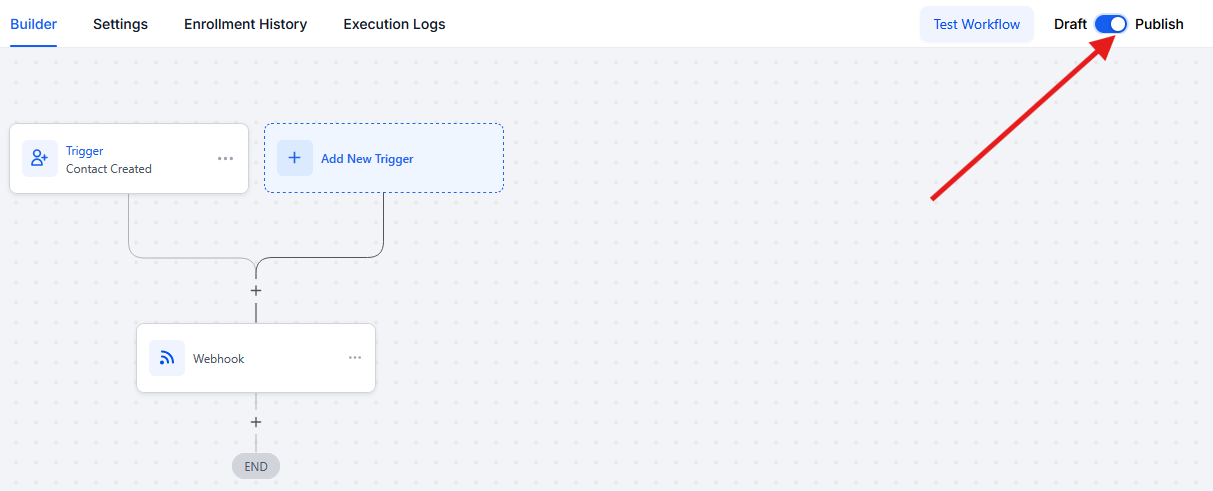
您的 Webhook 步骤将如下所示:
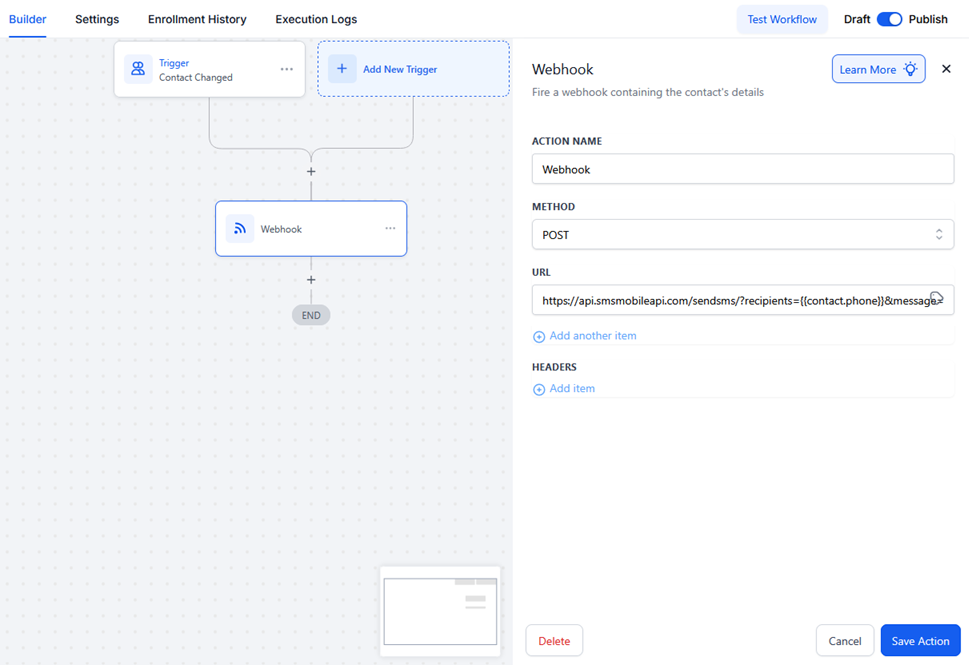
让我们一步一步来:
1)先决条件
- 访问GoHighLevel(工作流程)。
- 你的SMSMobileAPI API 密钥(可在您的仪表板上查看)或下载我们的官方应用程序免费获取您的 API 密钥。
- 具有有效电话号码的联系人(使用
{{contact.phone}}或您自己的自定义字段)。
2)创建或打开工作流
- 点击“添加新触发器”。
- 添加触发器(例如,联系人已创建, 表格已提交, 管道阶段已更改).
你可以将工作流程保持在草稿直至测试完成。
例如,这里将为每个联系方式变更,但当然工作流程也可以由任何其他操作触发。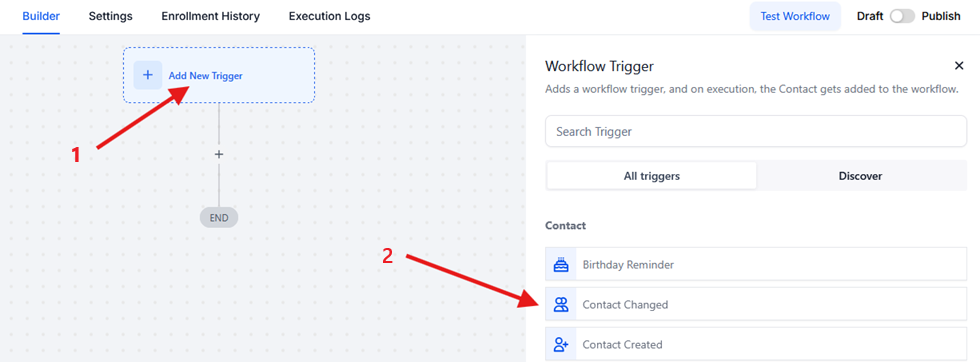
3)添加 Webhook 操作
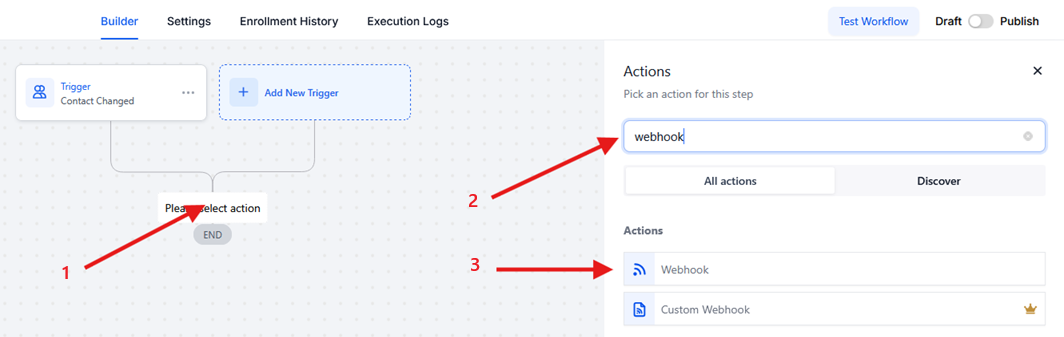
- 点击按钮完成自动化 (+)/结束
- 搜索Webhook.
- 点击Webhook操作列表中的按钮
4)配置Webhook
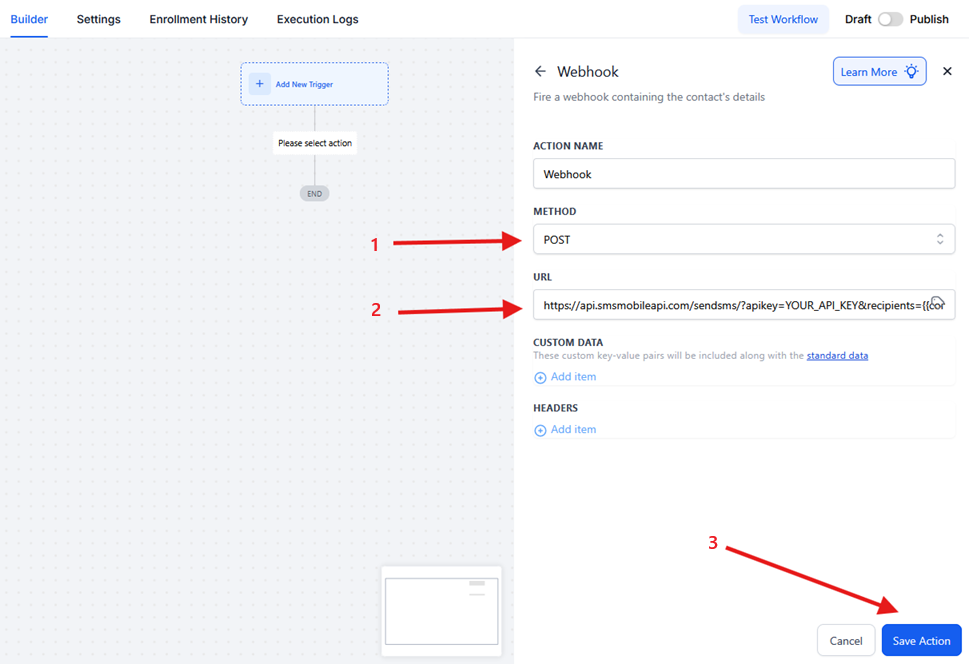
- 方法:
POST - 网址:粘贴您的 SMSMobileAPI 端点。例如:
- 节省自动化
The URL you need to use : https://api.smsmobileapi.com/sendsms/?apikey=YOUR_API_KEY&recipients={{contact.phone}}&message=Hello {{contact.first_name}}使用下面的链接作为您的 webhook;除了 API 密钥值和消息值之外,没有任何变化。代替YOUR_API_KEY用你的真钥匙。
代替Hello {{contact.first_name}}根据需要添加您的消息和变量
5)(可选)添加自定义数据
在自定义数据部分,您可以根据需要发送额外的字段(它们是可选的):
email = {{contact.email}}name = {{contact.first_name}}
如果您不需要它们,请将此部分留空。
6)测试工作流程
- 点击测试工作流程并选择一个具有有效电话号码的联系人。
- 检查GHL执行日志确认 Webhook 已运行。
- 打开你的SMSMobileAPI仪表板/日志来验证短信是否已发送。
7)发布
当你的测试看起来不错时,切换发布激活工作流程。
复制粘贴 URL 模板
欢迎
https://api.smsmobileapi.com/sendsms/?apikey=YOUR_API_KEY&recipients={{contact.phone}}&message=Hello {{contact.first_name}} Welcome aboard.预约提醒
https://api.smsmobileapi.com/sendsms/?apikey=YOUR_API_KEY&recipients={{contact.phone}}&message=Reminder your appointment is {{appointment.start_time}}. Reply YES to confirm.线索跟进
https://api.smsmobileapi.com/sendsms/?apikey=YOUR_API_KEY&recipients={{contact.phone}}&message=Hi {{contact.first_name}} ! thanks for your interest. Reply STOP to opt out.故障排除
- 未收到短信:确保
{{contact.phone}}存在并使用国际格式
并确保 SMSMobileAPI 应用程序正在您的手机上运行。 - 消息看起来已损坏:重新编码整个
message=价值。 - 不同的电话领域:代替
{{contact.phone}}使用您的自定义字段令牌。 - Webhook 没有触发:验证触发器是否真正运行并且工作流程没有暂停。

官方移动应用程序
电话、仪表板和API之间的安全桥
短信和呼叫业务通过官员SMSMobileAPI应用程序安装在您的连接电话上 。 应用软件安全地将设备与您的账户对齐,同步了授权的事件,并将移动网络连接到仪表板和REST API.
1移动应用程序给手机和它的SIM配对
2加密链接认证和保护过境数据
3发牌机和 API控制工作流程和活动
- 通过Google Play和App Store官方上市发布签名的版本
- Google和苹果平台审查、签署和发行控制
- 安全设备对接、HTTPS运输和认证的API访问
- 仅为您启用的移动特性所需的权限


