

Ürün Turu - Arazi Şablonları ve Zenginleştirilmiş SMS
Ana ekranları anlamak için basit bir görsel kılavuz: şablon oluşturma, örnekler takip etmek, SMS göndermek ve sonuçları analiz etmek.
Şablonlar Yöneticisi (Overview)
Bu ekran tüm Landing Page Şablonlarını listeler. Her kart anahtar alanları ve performans statlerini gösterir (önemli / bekleme).
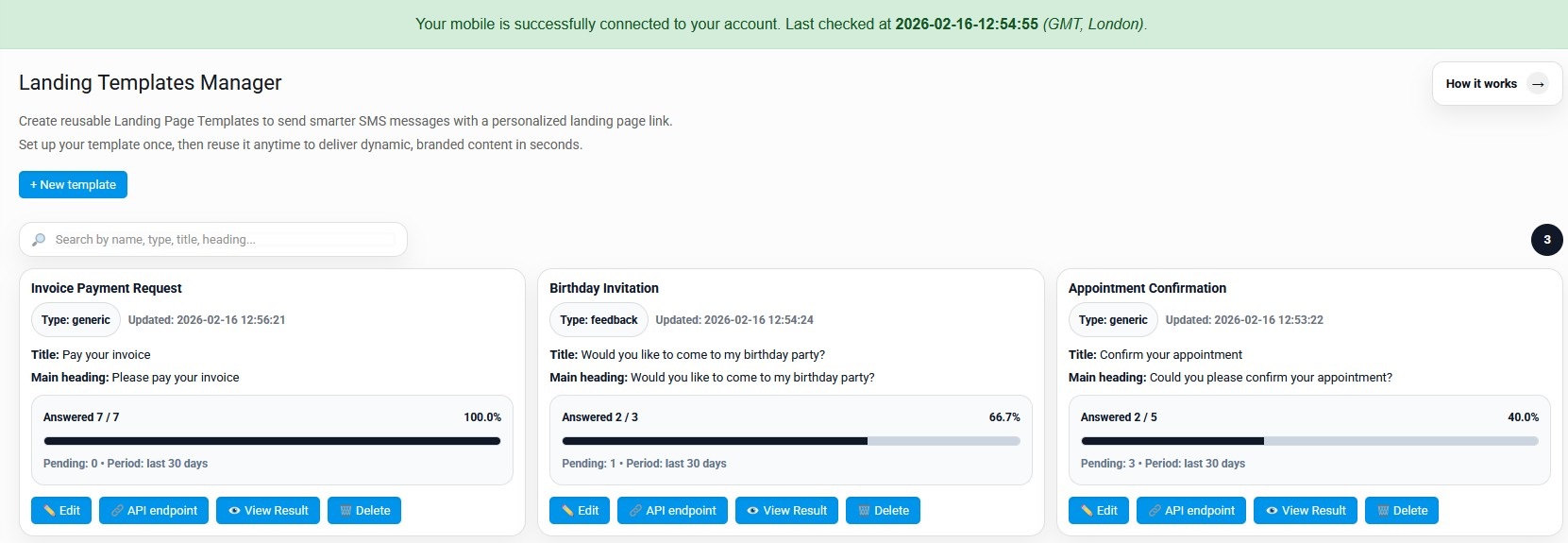
Main amaç
şablonlarınızı yönetin ve hangilerinin en iyi performans gösterdiğini hızlıca görün.
- İsim/tip/title ile şablonları arayın.
- Cevap oranı ve son aktiviteyi görün.
- Access actions: Edit Edit, API uç nokta, View Son Sayfa, Delete.
Tipik kullanım vakaları
- Fatura ödeme talepleri (YES/NO, Pay şimdi, vs.)
- Randevu onayı
- Event davetiyeleri (RSVP)
- Destek onayı / olay kabul
Edit Şablon
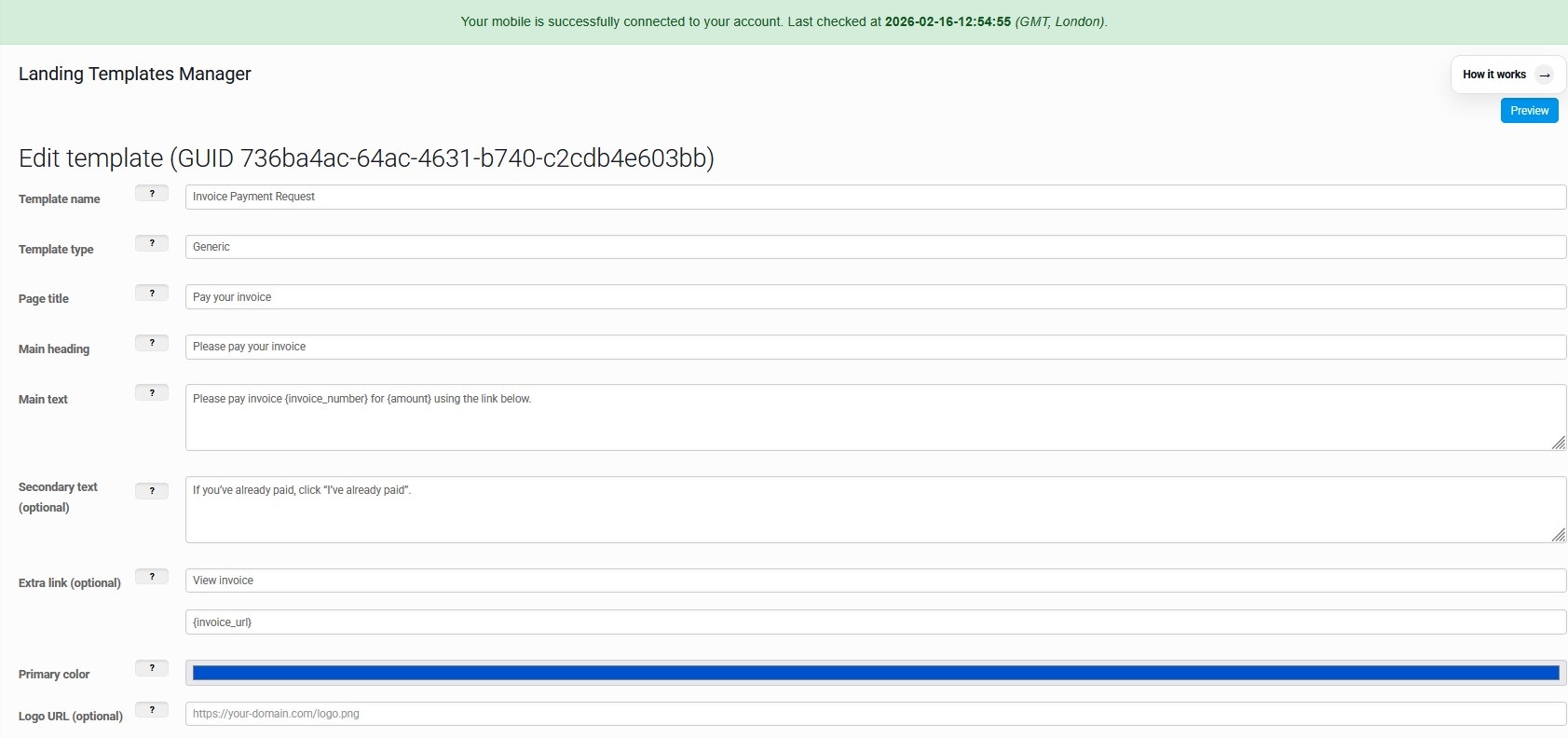
İniş sayfasında gösterilen içeriği yapılandırın: başlıklar, metin, yer sahipleri (dinamik alanlar), ve marka rengi.
İçerik alanları
- Şablon adı + tipi (örneğin, jenerik / geri bildirim).
- Arazi sayfası adı, ana başlık, ana metin.
- Seçmeli ikincil metin (extra context).
- Seçmeli ekstra bağlantı (örnek: “View in bill”).
Dinamik yer sahipleri
Kullanım yeri sahipleri gibi{inTR count}veya{miktarın miktarıMetininizde.
- Zaman gönderisinde, değerler enjekte ediliryer sahipleri json.
- Bu, alıcı başına eşsiz bir iniş sayfası oluşturur (instance).
- Marka: düğmeler ve aksanlar için birincil rengini seçin.
Araziler Page Instances
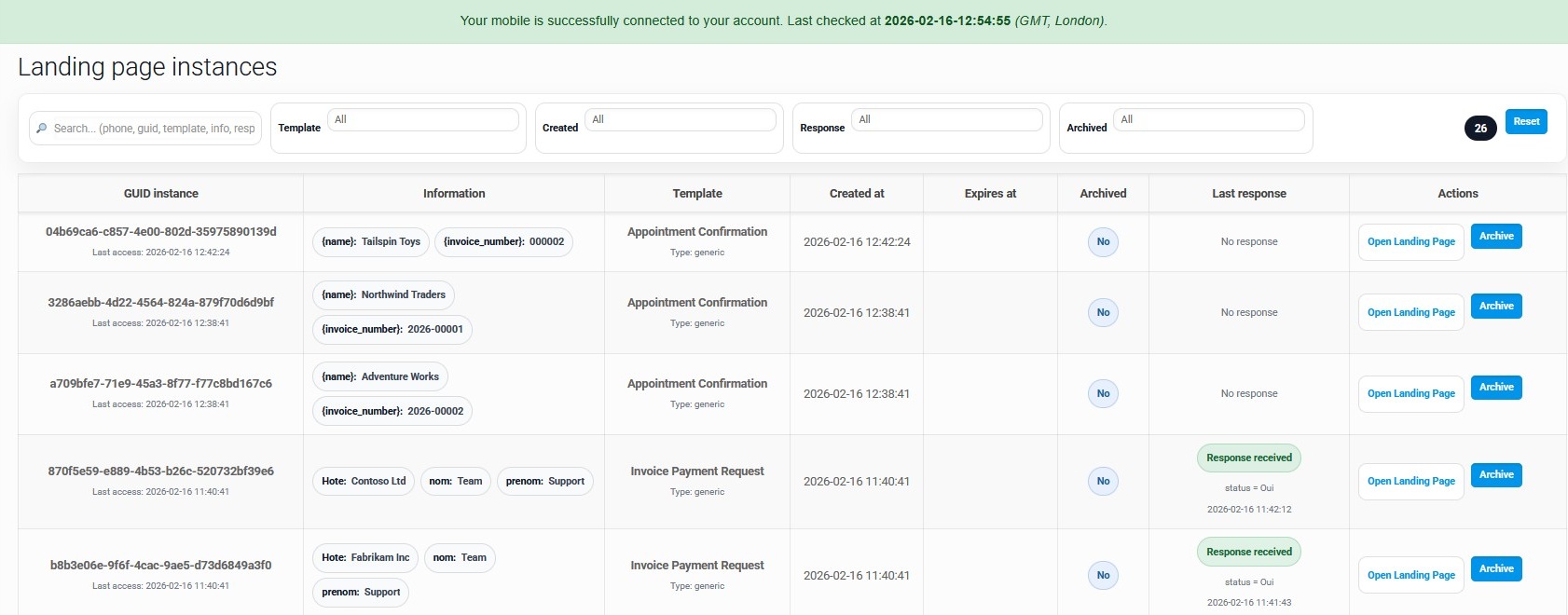
Her SMS kendi GUID ile eşsiz bir iniş sayfası yaratır. Bu ekran erişim ve cevapları takip etmenize yardımcı olur.
Ne görüyorsunuz
- GUID örnek+ son erişim zamanı.
- İndüklenen değerler önizleme (yer değerleriyle birlikte çipler).
- Şablon adı, yaratılan tarih, expiry, arşivlenmiş statü.
- Cevap durumu: “Hayır yanıt” / “Response aldı.
Ne yapabileceğiniz
- Açık AraziKullanıcının gördüğü tam sayfayı görmek için.
- Archive Archive ArchiveListeyi temiz tutmak için eski örnekler.
- Şablon tarafından filtre, tarih, yanıt, arşivlendi.
- Telefonla Arama / guid / şablon / bilgi.
Bir Landing Şablonu kullanarak SMS gönderin
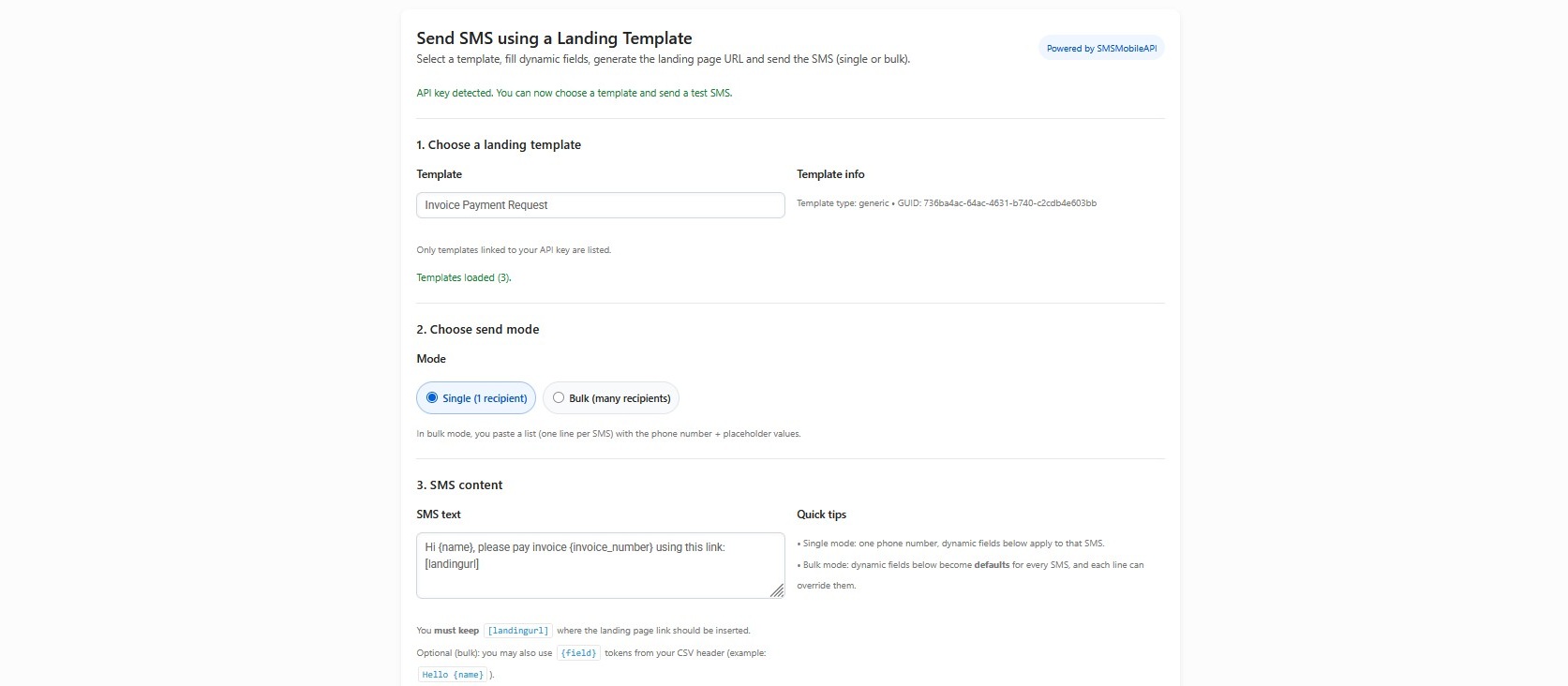
Bir şablon seçin, dinamik alanları doldurun, iniş URL'sini üretir, sonra SMS'i (single veya toplu).
Single mod
- Bir şablon seçin.
- 1 telefon numarası girin.
- Bir kez yer sahipleri doldurun (bu SMS'e başvurur).
- Hemen gönder.
Bulk modu
- Paste multiple hatları (bir alıcı hattı başına).
- Her çizgi, her satır üst düzeye sahip olan değerlere sahiptir.
- Sakla[Gücedele]Otomatik olarak kabul için SMS metninin içinde.
- Faturalar için ideal, hatırlatmalar, bildirimleri.
View Sonuç (Template Analytics)
Performansı görmek için açık bir pano: toplam örnekler, cevap verdi, beklendi ve en son yanıtlar.
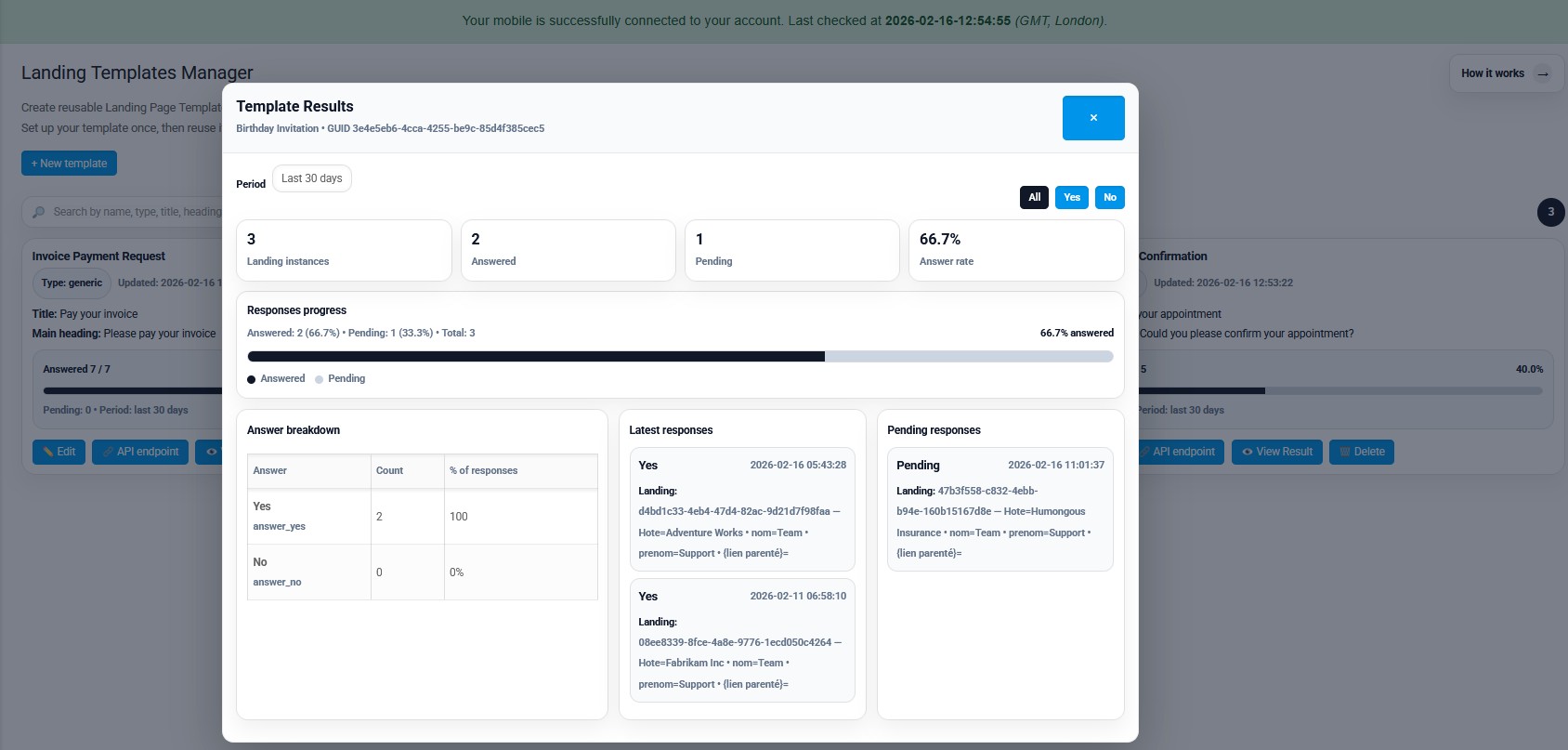
KPIs & ilerleme
- Toplam iniş örnekleri oluşturuldu.
- Beklenmeyen saymalara cevap verdi.
- Cevap oranı yüzdesi.
- İlerleme barı dönem (e.g. last 30 gün).
Derin detaylar
- Cevap bozulması (YES/NO) sayı ve% %.
- Son yanıtlar (değerlerle + zamantamps).
- Kim cevap vermedi bilmek için tebrik listesi.
- Filtreler (All / Evet / Hayır) hızlı bir okuma için.

Resmi mobil uygulama
Telefonunuz, kontrol paneliniz ve API arasındaki güvenli köprü.
SMS ve çağrı işlemleri, bağlı telefonunuza yüklenen resmi SMSMobileAPI uygulaması üzerinden geçer. Uygulama, cihazı güvenli bir şekilde hesabınızla eşleştirir, yetkili etkinlikleri senkronize eder ve mobil ağı kontrol paneline ve REST API'ye bağlar.
- Resmi Google Play ve Apple App Store listeleri aracılığıyla dağıtılan imzalı sürümler
- Google ve Apple platform incelemesi, imzalama ve dağıtım kontrolleri
- Güvenli cihaz eşleştirme, HTTPS aktarımı ve kimlik doğrulamalı API erişimi
- Yalnızca etkinleştirdiğiniz mobil özellikler için gerekli izinler


