

Produkttur - Landing Mallar & Berikat SMS
En enkel visuell guide för att förstå de viktigaste skärmarna: mallskapande, exempel spårning, skicka SMS och resultatanalys.
Mallars Manager (Översikt)
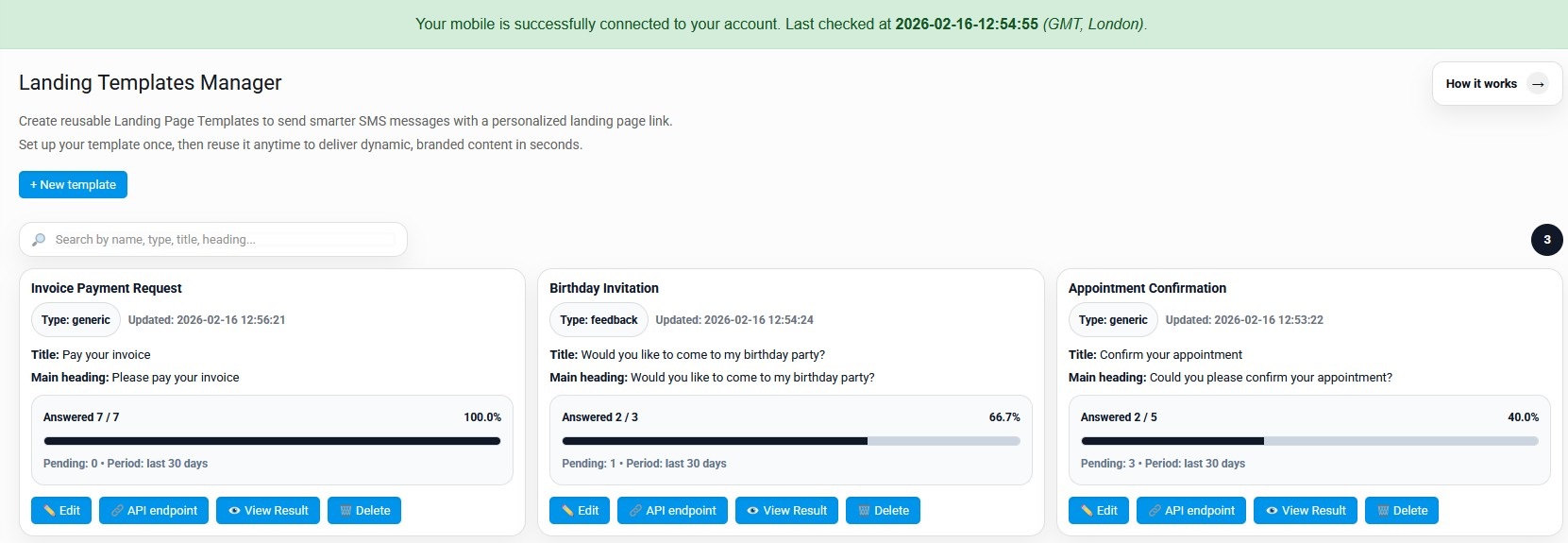
Den här skärmen listar alla dina landningssidor mallar. Varje kort visar nyckelfält och prestandastatistik (svart/pågående).
Huvudsyfte
Hantera dina mallar och snabbt se vilka som presterar bäst.
- Sök mallar efter namn/typ/titel.
- Se svarsfrekvens och ny aktivitet.
- Åtkomståtgärder:Edit, API endpoint, Visa resultat, Ta bort.
Typiska användningsfall
- Fakturabetalningsförfrågningar (JA/NEJ, Betala nu etc.)
- Bekräftelser för utnämningen
- Event inbjudningar (RSVP)
- Stödbekräftelser/incidentbekräftelser
Redigera mall
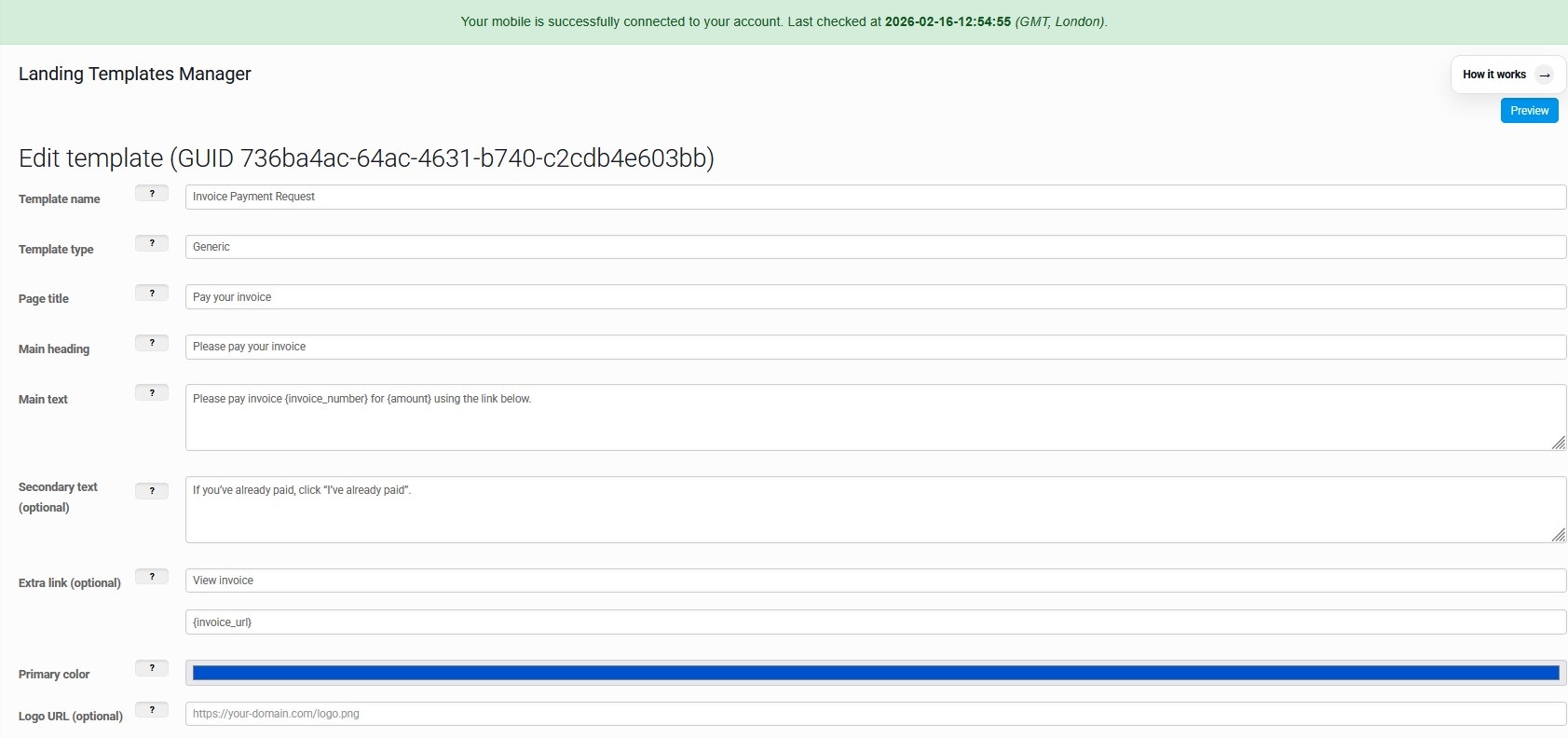
Konfigurera innehållet som visas på landningssidan: titlar, text, platshållare (dynamiska fält) och märkningsfärgen.
Innehållsfält
- Malta namn + typ (t.ex. generisk / feedback).
- Landningssida titel, huvudrubrik, huvudtext.
- Valfri sekundär text (extra sammanhang).
- Valfri extra länk (exempel: ”Visa faktura”).
Dynamiska platshållare
Använd platshållare som{Faktura number}eller{Amount}i din text.
- Vid sändning injiceras värdena viaPlatshållare json.
- Detta ger en unik målsida per mottagare (instans).
- Branding: Välj den primära färgen för knappar och accenter.
Landing Page Instances
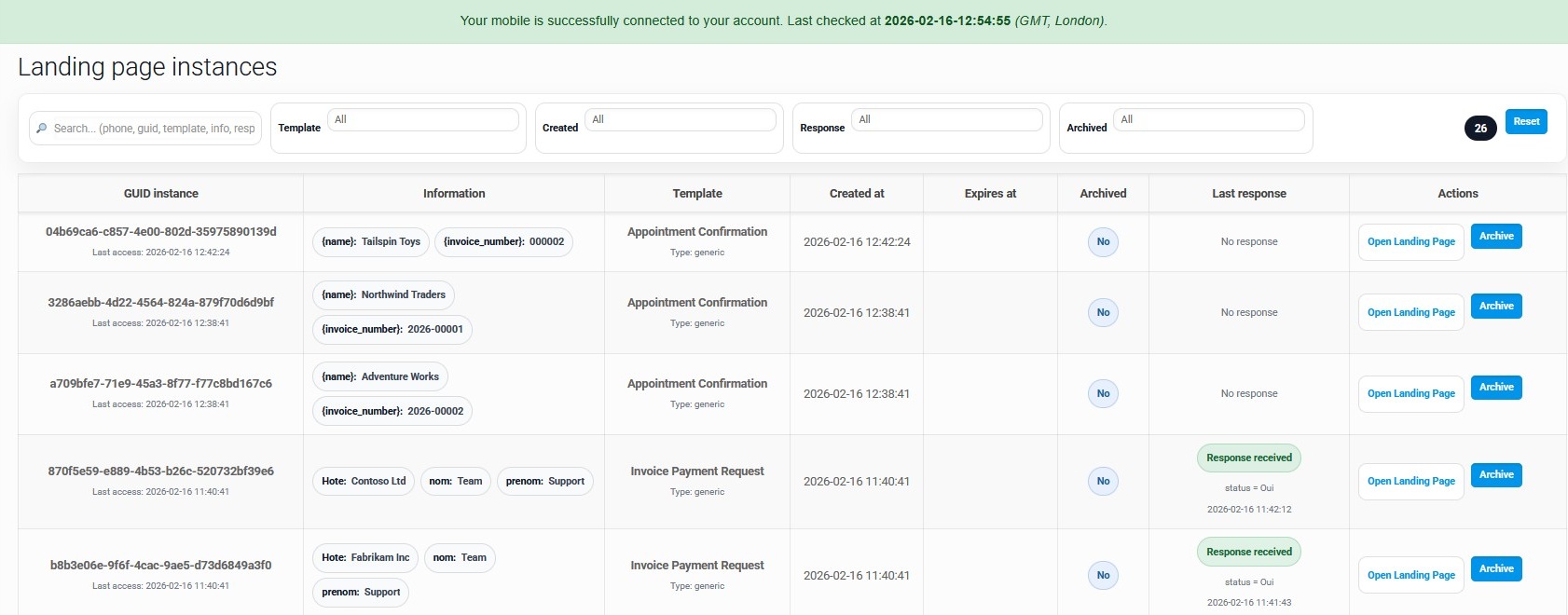
Varje SMS skapar en unik landningssida med sin egen GUID. Den här skärmen hjälper dig att spåra åtkomst och svar.
Vad du ser
- GUID-instans+ sista åtkomst timestamp.
- Injicerade värden förhandsgranskning (chips med placeholder-värden).
- Malta namn, skapat datum, utgång, arkiverad status.
- Svarsstatus: "Inget svar" / "Response mottagen".
Vad du kan göra
- Öppna landningssidorför att visa den exakta sidan användaren ser.
- Arkivgamla instanser för att hålla listan ren.
- Filtrera efter mall, skapad datum, svar, arkiverad.
- Sök via telefon / guid / mall / info.
Skicka SMS med en landningsmall
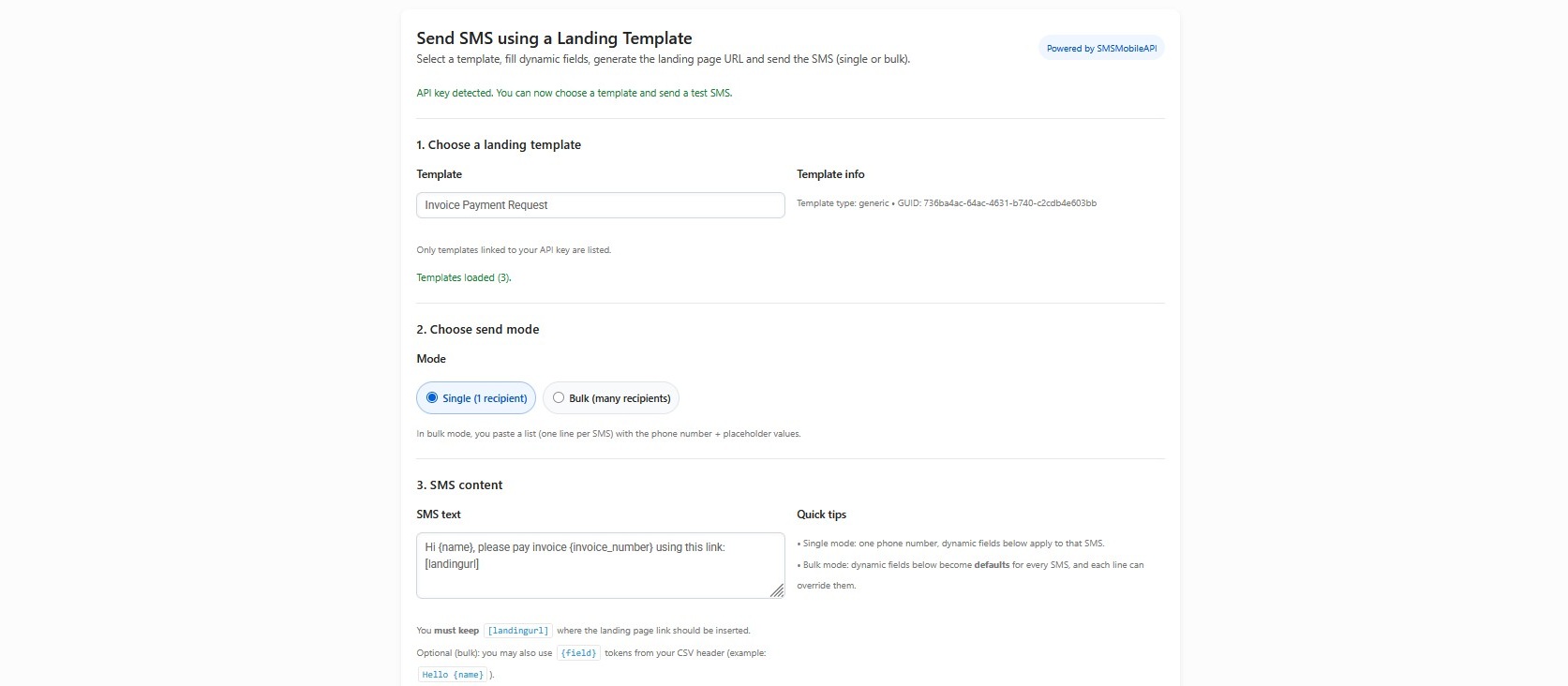
Välj en mall, fyll dynamiska fält, generera landningsadressen, skicka sedan SMS (enkel eller bulk).
Single läge
- Välj en mall.
- Ange 1 telefonnummer.
- Fyll platshållare en gång (gäller för det SMS).
- Skicka omedelbart.
Bulk mode
- Klistra på flera rader (en mottagare per rad).
- Varje rad kan åsidosätta värdena för platshållare.
- Håll[[landingurl]Inom SMS-text för autoinjektion.
- Perfekt för fakturor, påminnelser, meddelanden.
Visa resultat (Template Analytics)
En tydlig instrumentbräda för att se prestanda: totala instanser, besvarade, väntade och de senaste svaren.
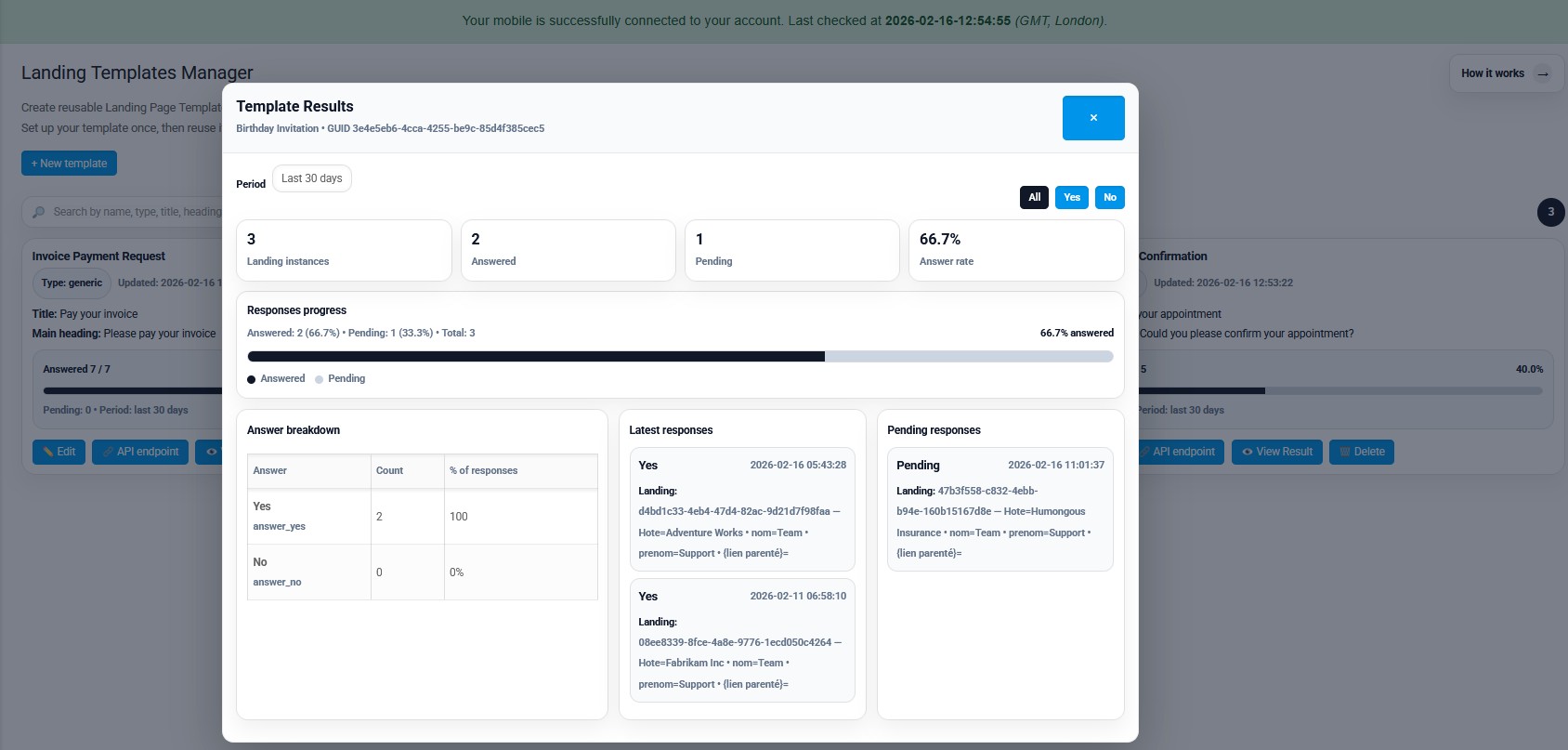
KPIs & progression
- Totala landningsinstanser skapade.
- Besvarade vs väntande räkning.
- Svarsfrekvens procent.
- Progress bar per period (t.ex. i 30 dagar).
Djup detaljer
- Svarsfördelning (JA/NO) med räkning och %.
- Senaste svar (med värden + tidsstämplar).
- I väntan på listan för att veta vem som inte svarade.
- Filter (All / Yes / No) för snabbläsning.

Officiell mobilapplikation
Den säkra bron mellan din telefon, instrumentpanel och API.
SMS och samtalsoperationer passerar genom den officiella SMSMobileAPI-appen installerad på din anslutna telefon. Appen parar säkert enheten med ditt konto, synkroniserar auktoriserade händelser och länkar mobilnätet till instrumentpanelen och REST API.
- Signerade releaser som distribueras via de officiella listorna Google Play och Apple App Store
- Google och Apple plattformsgranskning, signering och distributionskontroller
- Säkra enhet parning, HTTPS transport och autentiserad API tillgång
- Endast de behörigheter som krävs för de mobila funktionerna du aktiverar


