

Vad du får
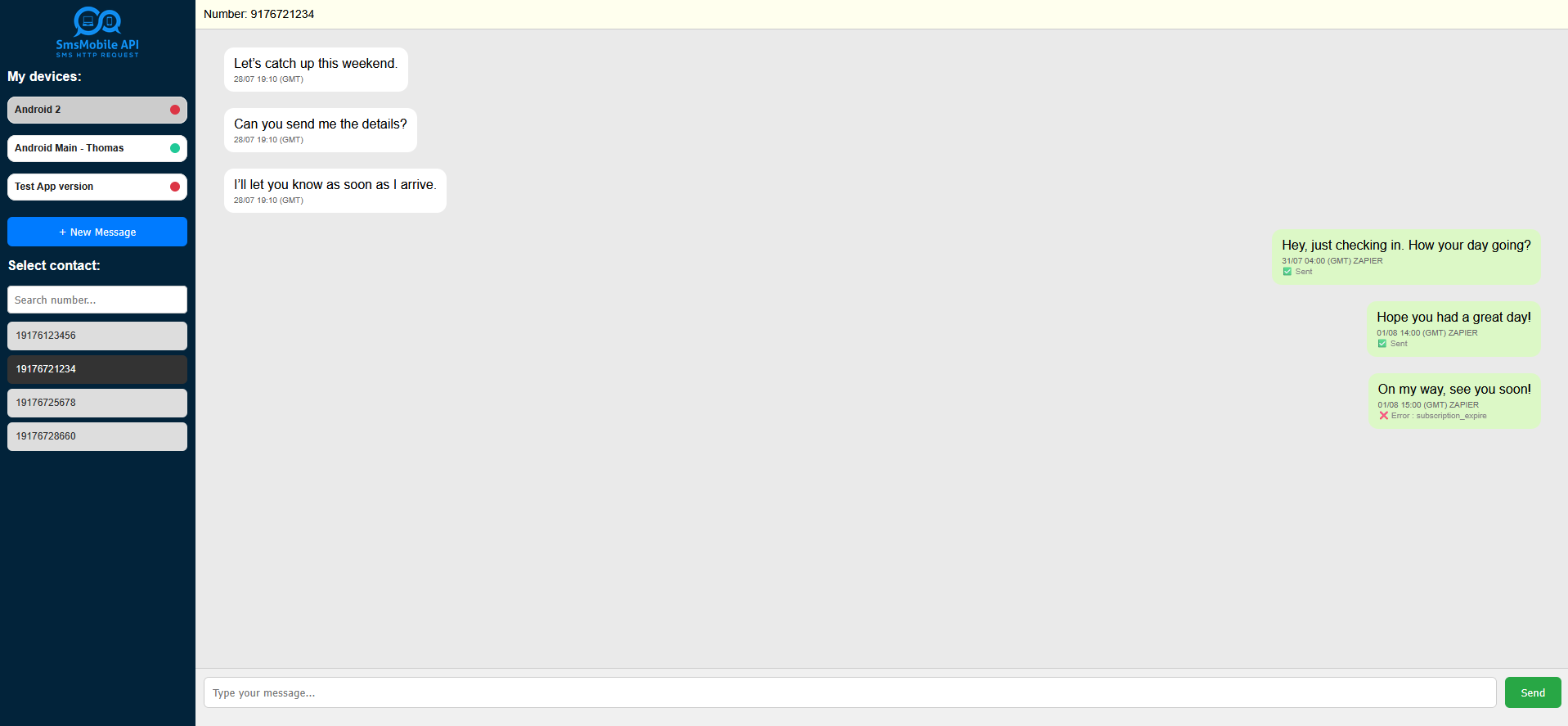
Conversation View
Vänster: mottagen • Rätt: skickad. Allt i tidsbeställning.
Skicka från webben
Skriv och skicka; din telefon skickar SMS.
Auto-refresh
Nya meddelanden visas automatiskt i tråden.
← Multi-phone
Anslut flera telefoner och växla i ett klick.
Snabb förhandsvisning
Meddelanden skickas av din anslutna telefon. Svar landar tillbaka i samma konversation.
⚙️Hur det fungerar
1Anslut telefonen (er)
Installera och logga in på SMSMobileAPI-appen på din telefon. Den länkar din enhet till din instrumentpanel.
2Öppna chatten Live SMS
Välj ett nummer i den vänstra panelen. Vi normaliserar automatiskt format (+, 00, ledande nollor) för att gruppera meddelanden korrekt.
3Chatta normalt
Skicka från webben; din telefon skickar SMS. Inkommande svar dyker upp omedelbart i samma tråd.
Hur man får tillgång till Chat Live SMS
Att komma igång är snabbt och enkelt:
- Logga in på dinSMSMobileAPIDashboard.
- Klicka på den stora"Chatt Live SMSknappen som finns i huvudmenyn.
- När chatten öppnas kan duKopiera den säkra länkenfrån din webbläsares adressfält och spara den till skrivbordet eller bokmärken för omedelbar åtkomst när som helst.
Tips: Bokmärksamma den säkra länken låter dig hoppa rakt in i din konversationsvy utan att navigera genom instrumentbrädan.
▶ Använda fall
Vår konversationsvy är inte bara för att chatta - här är hur du kan få det att fungera för ditt företag eller team:
^ Centralisera flera telefoner
Om du använder flera mobiler, se alla inkommande och utgående SMS i en instrumentpanel.
Team Budskapsnav
Gruppmeddelanden från ditt tekniska team, försäljning och andra avdelningar till ett ställe för snabbare uppföljning.
· Monitor inkommande trafik
Håll ett öga på inkommande SMS i realtid – perfekt för supportdisk eller brådskande varningar.
❑ Mobile Fleet Management
Hantera och spåra ditt företags mobila enheter och SMS-aktivitet från en kontrollpanel.
Sekretessförst
Dina meddelanden skickas frånDitt telefonnummerDashboard låter dig visa, söka och svara; din telefon förblir avsändaren av rekord.
Du kan koppla bort en enhet när som helst.
Krav
- Aktivt SMSMobileAPI-konto + API-nyckel
- SMSMobileAPI app ansluten på din telefon
- Nätverksåtkomst i telefonen för att skicka/ta emot
FAQ
Kommer meddelanden från mitt eget telefonnummer?
Kan jag hantera flera telefoner?
Tänk om ett nummer visas i olika format?
Finns det en auto-refresh?


Officiell mobilapplikation
Den säkra bron mellan din telefon, instrumentpanel och API.
SMS och samtalsoperationer passerar genom den officiella SMSMobileAPI-appen installerad på din anslutna telefon. Appen parar säkert enheten med ditt konto, synkroniserar auktoriserade händelser och länkar mobilnätet till instrumentpanelen och REST API.
- Signerade releaser som distribueras via de officiella listorna Google Play och Apple App Store
- Google och Apple plattformsgranskning, signering och distributionskontroller
- Säkra enhet parning, HTTPS transport och autentiserad API tillgång
- Endast de behörigheter som krävs för de mobila funktionerna du aktiverar


