

How to Configure Access Permissions for SMS Mobile API
To ensure SMS Mobile API functions smoothly and meets your needs, it's important to verify that your mobile device grants the necessary access permissions to send SMS messages via our mobile application. By enabling these permissions, you'll unlock the full functionality of SMS Mobile API for seamless messaging directly from your phone.Step 1: Enter into Settings
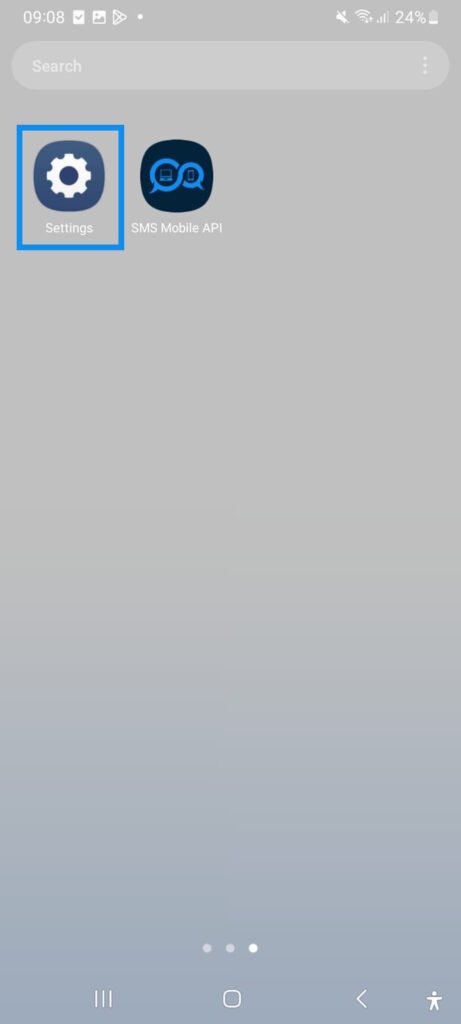
Click 'Settings' to start configuring SMS access permissions with SMS Mobile API! Ensure seamless SMS notifications by allowing the necessary permissions for SMS Mobile API to function smoothly. Get started now to unlock easy, direct SMS management from your mobile!
Unlike other services, our SMS Mobile API app is thoroughly verified and approved by both Google and Apple, demonstrating our commitment to privacy and security standards. Each version of the SMS Mobile API app undergoes stringent checks by Google and Apple to comply with their security and privacy regulations, giving you peace of mind and a trusted experience every time.
Unlike other services, our SMS Mobile API app is thoroughly verified and approved by both Google and Apple, demonstrating our commitment to privacy and security standards. Each version of the SMS Mobile API app undergoes stringent checks by Google and Apple to comply with their security and privacy regulations, giving you peace of mind and a trusted experience every time.
Step 2: Enter into the Apps List
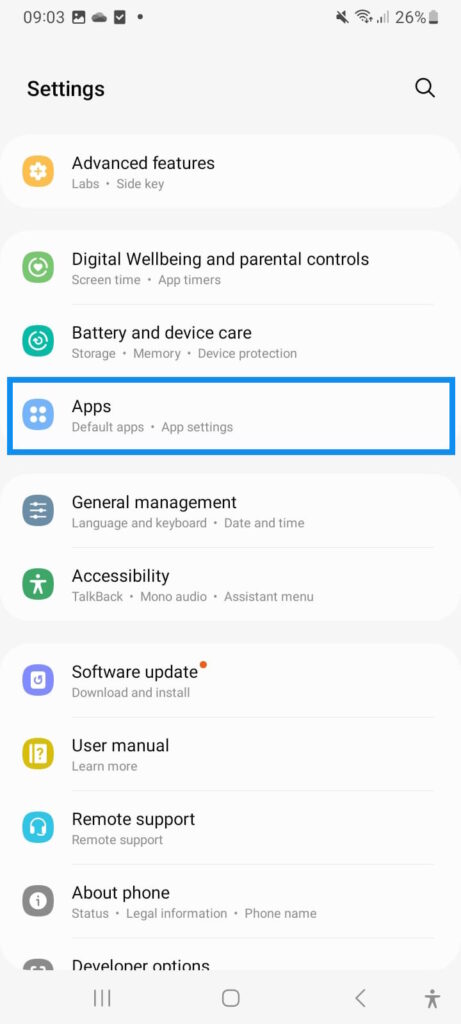
Navigate to the 'App' menu to easily search for and select the SMS Mobile API app. This menu provides a quick way to locate the app and set up essential permissions for seamless SMS management. Start now to ensure smooth operation and stay connected with SMS Mobile API!
Step 3: Search for and Open the SMS Mobile API App
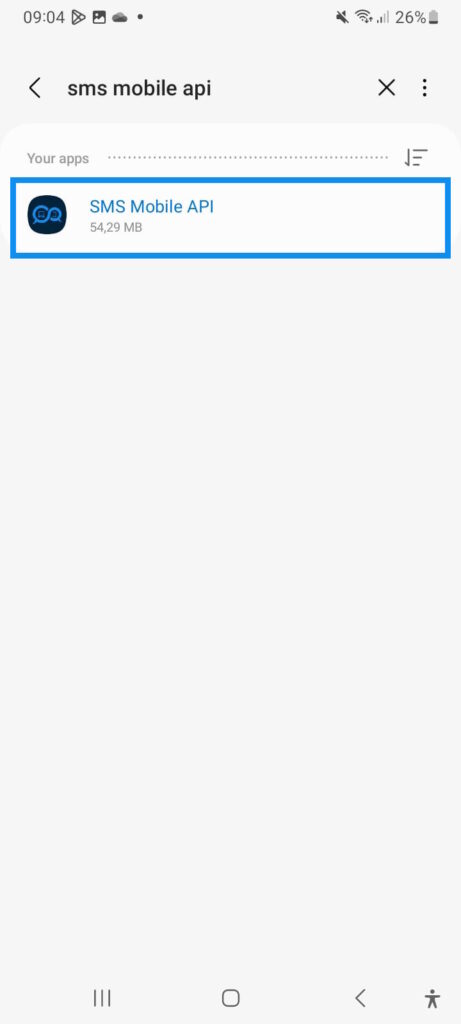
Search for and select the SMS Mobile API app to get started with streamlined SMS management. Quickly find the app in your device's settings to ensure all permissions are in place for smooth, efficient SMS communication. Begin now with SMS Mobile API!
Step 4: Access SMS Permissions
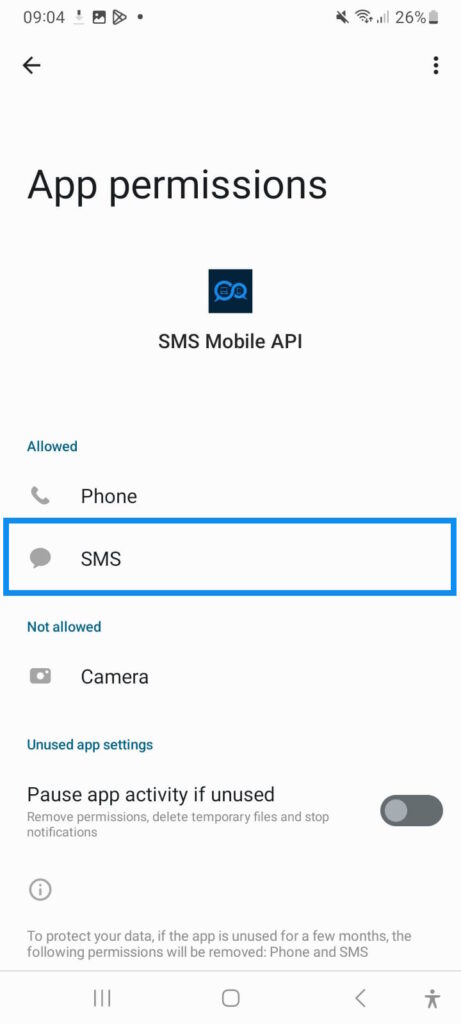
Select the 'SMS' option to access and configure SMS permission settings for seamless communication. Ensuring the right permissions are set allows SMS Mobile API to operate smoothly, providing reliable and efficient SMS management. Get started by choosing 'SMS' in your settings!
Step 5: Grant SMS Permissions
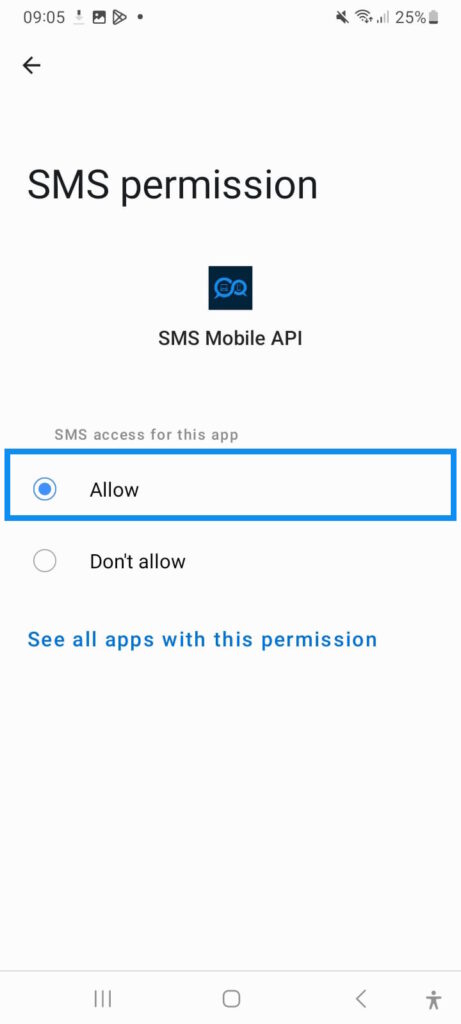
Click 'Allow' to grant permissions to SMS Mobile API for seamless SMS communication through API requests. Rest assured, this permission is used solely to manage the SMS you send via our API – no other usage is involved. To reinforce our commitment to providing you with a professional tool, SMS Mobile API is the only application authorized by Android and Apple to send SMS messages. Begin secure, efficient SMS management with SMS Mobile API today!
Step 6: Grant Phone Permissions
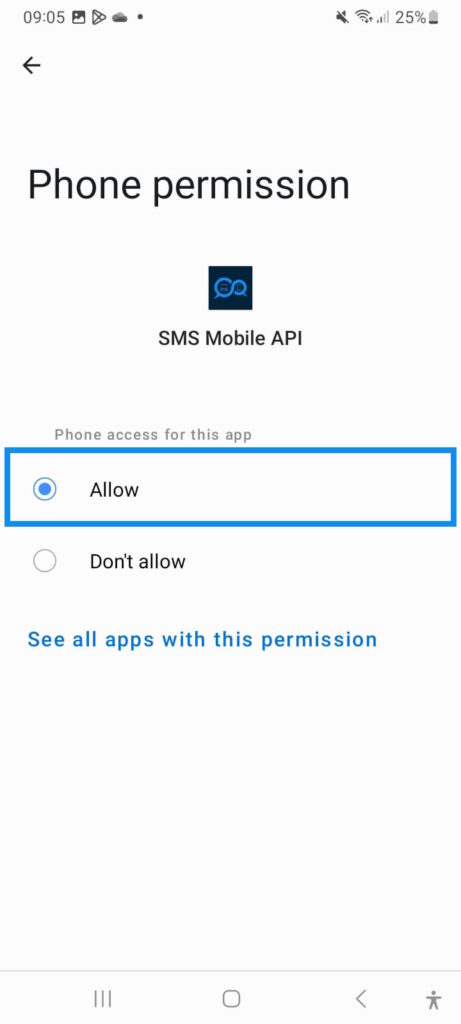
Click 'Allow' for phone access as well to ensure SMS Mobile API functions smoothly. Rest assured, SMS Mobile API only requests the minimum necessary permissions to operate efficiently. Your privacy is a priority, and access is limited strictly to essential functions for SMS management. Get started with confidence in SMS Mobile API’s secure and minimal permission requirements!
Using SMSMobileAPI means choosing an app that has passed rigorous testing and quality checks, ensuring that what you get is not just an application, but a promise of reliability and transparency. Our presence on both the Google Play Store and the Apple App Store is a testament to our commitment to excellence, offering you an application that is constantly updated to meet and exceed user expectations on all platforms.
With SMSMobileAPI, you're not just downloading an app; you're embracing a trusted partner in communication. Our user-friendly interface and innovative features are designed to enhance your messaging experience, making it more efficient and enjoyable. Whether for personal or professional use, SMSMobileAPI caters to all your communication needs with the highest standards of security and performance.
Don't settle for less when it comes to your mobile application needs. Choose SMSMobileAPI on the Google Play Store or the Apple App Store today and experience the difference that a certified, verified, and platform-approved app can make. Say goodbye to the risks of unverified APKs and hello to a world of seamless, secure, and stable mobile communication with SMSMobileAPI.
Download SMSMobileAPI from the Google Play Store or the Apple App Store and elevate your communication experience today.
Don't settle for less when it comes to your mobile application needs. Choose SMSMobileAPI on the Google Play Store or the Apple App Store today and experience the difference that a certified, verified, and platform-approved app can make. Say goodbye to the risks of unverified APKs and hello to a world of seamless, secure, and stable mobile communication with SMSMobileAPI.
Download SMSMobileAPI from the Google Play Store or the Apple App Store and elevate your communication experience today.

Official mobile application
The secure bridge between your phone, dashboard and API.
SMS and call operations pass through the official SMSMobileAPI app installed on your connected phone. The app securely pairs the device with your account, synchronizes authorized events and links the mobile network to the dashboard and REST API.
1Mobile appPairs the phone and its SIM
2Encrypted linkAuthenticates and protects data in transit
3Dashboard & APIControls workflows and activity
- Signed releases distributed through the official Google Play and Apple App Store listings
- Google and Apple platform review, signing and distribution controls
- Secure device pairing, HTTPS transport and authenticated API access
- Only the permissions required for the mobile features you enable


