

Outgoing Calls Log from Mobile (Dashboard + API Access)
With SMSMobileAPI, you can retrieve and list outgoing calls made from your mobile phone
directly in your dashboard and through the API.
This gives you a clear and complete overview of your outbound phone activity:
called number, contact name, call date/time, duration, and more — all centralized for reporting, monitoring, and integrations.
View Outgoing Calls in Your SMSMobileAPI Dashboard
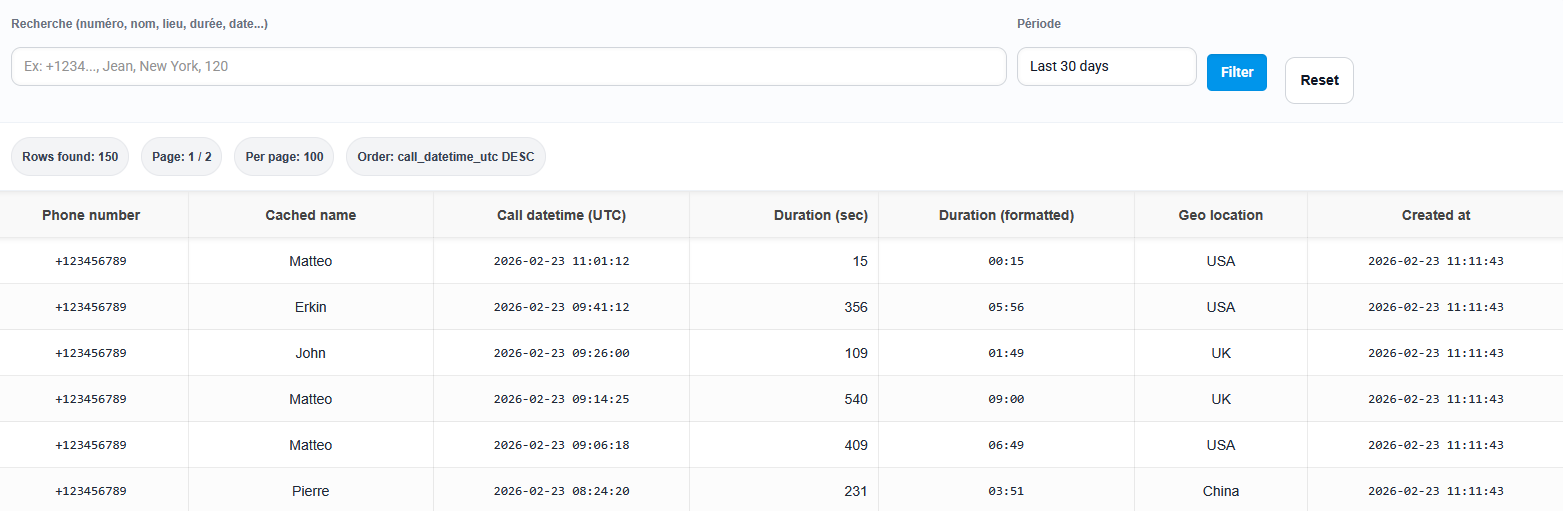
All your outgoing calls can be automatically synchronized from your phone and displayed in your SMSMobileAPI dashboard. This makes it easy to track call activity without switching between your phone history and your business tools.
You can quickly search by keyword (number or contact name) and filter by date range to find a call in seconds. This is especially useful for sales follow-ups, support tracking, and team activity review.
What Information Is Available for Each Outgoing Call?
SMSMobileAPI helps you build a reliable outbound call log with the key information you need for daily operations and integrations. Depending on your setup and device permissions, your outgoing call logs can include:
- Phone number called
- Cached contact name (if available on the mobile device)
- Call date and time
- Call duration
- Creation/sync timestamp in your dashboard logs
- API access to retrieve the same data programmatically
This structured format is ideal for creating call activity reports, reconciling manual work, and keeping a trace of outbound communication from a business mobile phone.
Automate Every Outgoing Call with Smart Rules
Build powerful outgoing call automation rules to manage calls exactly the way your business needs.
Automatically trigger notifications, run webhook or API actions, and launch custom workflows as soon as an outgoing call is detected.
Set your own conditions, schedules, days, numbers, devices, and actions for complete control and flexibility.
With SMSMobileAPI, outgoing calls are not just logged—they become actionable events inside your business workflow.

Outgoing Calls API (Calls You Make)
SMSMobileAPI gives you a powerful API to retrieve your outgoing call logs directly from your mobile phone.
Your phone remains the source of truth: call history is synchronized from the device, then exposed through the API
so you can connect it to any system.
This means your outbound call activity becomes actionable data: you can automate follow-ups, track performance, build KPIs, and keep a complete outbound history across your tools.
Example use cases:
- Create a CRM activity automatically after each outgoing call
- Trigger a follow-up workflow when a call duration is too short (no answer, voicemail, quick hang-up)
- Measure outbound activity by agent (phone/account) or by time period
- Cross-check calls against leads, tickets, orders, or appointments
- Build internal analytics for sales and customer support teams
Endpoint: list outgoing calls by date range (simple and automation-ready).
GET https://api.smsmobileapi.com/call/outgoing/list/
Learn more about the Outgoing Calls API in the official documentation
Get a Complete Outbound Activity Overview
By listing outgoing calls from the mobile phone in your dashboard and API, you gain a complete overview of outbound communication.
This helps you better understand who was contacted, when, and for how long — making it easier to monitor follow-ups, team productivity, and customer interactions over time.
Search, Filter, and Review Calls Faster
Instead of manually checking a phone call history, your team can review outbound call activity directly from the web dashboard with fast filters and date ranges.
It becomes much easier to investigate a client request, validate a follow-up, or review a support action without losing time.
Practical Use Cases for Outgoing Calls Log (Mobile + API)
Sales Follow-Up Tracking
Keep a record of outbound calls made to prospects and clients, then connect the data to your sales pipeline.
Support Quality Monitoring
Review support callbacks and call duration patterns to improve response quality and team organization.
Internal Reporting
Build monthly or weekly outbound call reports using the dashboard filters or export logic through your API workflows.
CRM Activity Synchronization
Automatically create notes, call tasks, or customer timeline entries in your CRM after each outgoing call.
Audit Trail for Teams
Maintain a structured outbound communication history for business processes and customer follow-up consistency.
Custom Automation with API
Trigger your own scripts and workflows based on call date, number, duration, or schedule.
Built for Mobile-Centered Workflows
SMSMobileAPI is designed to connect your real mobile phone activity to your web tools. This outgoing call log feature is especially useful if your business relies on calls made directly from a mobile device.
FAQ — Outgoing Calls Log with SMSMobileAPI
Can I list outgoing calls made from my mobile phone in the SMSMobileAPI dashboard?
Yes. SMSMobileAPI can retrieve outgoing calls from your mobile device and display them in your dashboard, giving you a centralized view of your outbound call history.
Can I access outgoing call logs via API?
Yes. You can use the SMSMobileAPI API to retrieve outgoing call logs and connect them to your CRM, reports, automations, or internal tools.
What data can I see for an outgoing call?
Typical fields include the called number, contact name (if available), call date/time, and duration, depending on the device and available permissions.
Can I search and filter outgoing calls in the dashboard?
Yes. You can filter by period and search using keywords such as phone number or contact name to quickly find a specific outgoing call.
Is this feature available on iPhone (iOS)?
Outgoing call log access depends on platform capabilities and permissions. The feature is designed for Android workflows.
Track Every Outgoing Call from Your Mobile — in Dashboard and API
Centralize your outbound phone activity, improve visibility, and build automations around real mobile calls with SMSMobileAPI.

Outgoing calls log retrieval is available on Android.
Set up your dashboard, API access, and integrations from the web.
 English
  French
  German
  Spanish
  Portuguese
  Russian
  Finnish
  Japanese
  Chinese
  Vietnamese
  Dutch
Dutch  Greek
Greek  Arabic
  Danish
  Italian
  Ukrainian