
Incoming Calls Log (Answered Calls) with Dashboard + API Access
With SMSMobileAPI, you can now list incoming calls that were answered (non-missed) and access them from your dashboard and via API. This feature gives you a clear and complete view of your inbound phone activity: caller number, contact name, call date/time, duration, and more — all centralized for easier monitoring and integrations.
View Answered Incoming Calls in Your Dashboard
All your incoming answered calls can be automatically retrieved from your phone and listed in your
SMSMobileAPI dashboard.
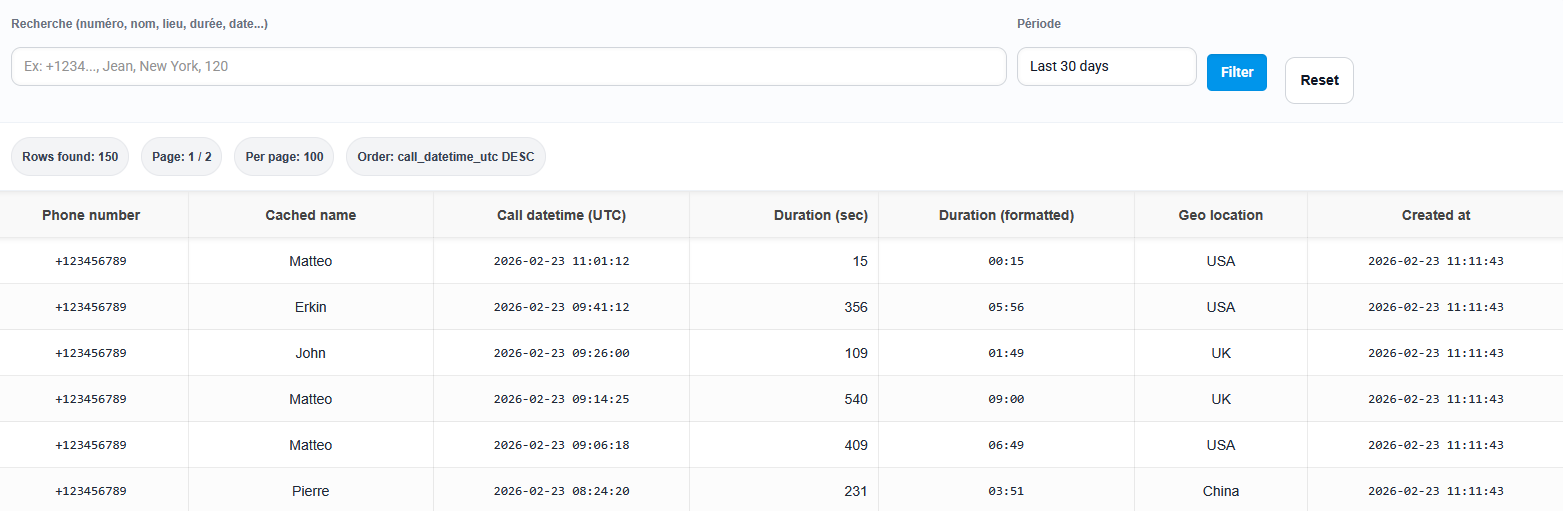
You get a clean log with essential information such as:
- Caller phone number
- Cached contact name (when available)
- Call date and time
- Call duration
- Geolocation / context data (if available)
This gives you a complete overview of your real incoming conversations, not just missed calls, directly from the web dashboard.
Search, Filter and Review Your Incoming Call History
For daily operations and support teams, having a raw list is not enough. SMSMobileAPI makes it easier to work with your incoming calls log by allowing you to:
- Search by keyword (number or contact name)
- Filter by date range to review a specific period
- Sort and inspect call activity for faster follow-up
- Get a complete overview of inbound answered calls for reporting or customer support
This is ideal for business users who need visibility across conversations and want to keep a reliable inbound call history accessible from a single place.
Automate Every Incoming Call with Smart Rules
Build powerful incoming call automation rules to manage answered calls exactly the way your business needs.
Automatically trigger notifications, run webhook or API actions, and launch custom workflows as soon as an incoming call is detected and answered.
Set your own conditions, schedules, days, numbers, devices, and actions for complete control and flexibility.
With SMSMobileAPI, incoming calls are not just logged—they become actionable events inside your business workflow.

Incoming Calls API (Answered Calls)
SMSMobileAPI doesn’t just display your incoming answered calls in the dashboard —
it gives you a powerful API to list your incoming calls directly from your mobile phone.
Your phone stays the source of truth: calls are synchronized from your mobile call history, then instantly usable in your own systems via API.
This is a game-changer if you want real call data that matches what happens on the device.
- Sync answered inbound calls into your CRM automatically
- Trigger workflows after a call (follow-up SMS, email, task creation, notes)
- Build support & sales KPIs from real incoming call activity
- Create internal dashboards, reports, exports, and custom automation scripts
One simple endpoint gives you a clean list of incoming calls — ready for automation.
GET https://api.smsmobileapi.com/call/incoming/list/?apikey=YOUR_API_KEY&start_date=YYYY-MM-DD&end_date=YYYY-MM-DD HTTP/1.1
Host: api.smsmobileapi.com
Accept: application/json
Learn more about the Incoming Calls API in the official documentation
Get a Complete Inbound Call Overview
By combining mobile collection, dashboard visibility, and API access,
SMSMobileAPI helps you build a complete picture of your incoming answered calls.
Whether you want to monitor customer interactions, review call activity, or power your own integrations,
this feature gives you a reliable and practical way to manage inbound call data from end to end.
Centralize Your Incoming Calls Data
List answered incoming calls from your phone, view them in your dashboard, and access them via API for a full operational overview.

This feature is available on Android only.
No Android phone yet?
You can still create your account and prepare your dashboard.
 English
  French
  German
  Spanish
  Portuguese
  Russian
  Finnish
  Japanese
  Chinese
  Vietnamese
  Dutch
Dutch  Greek
Greek  Arabic
  Danish
  Italian
  Ukrainian