

SMSMobileAPI Call Management: Missed, Incoming Answered & Outgoing Calls in One Dashboard
SMSMobileAPI lets you connect your mobile phone to your dashboard and API
to automatically retrieve and manage your call activity in one place.
From missed calls to incoming answered calls and outgoing calls,
everything is centralized with logs, advanced statistics, reports, filters, and CSV exports.
Video Overview: How SMSMobileAPI Call Management Works
Watch a quick overview of how to connect your mobile phone, view call logs in the dashboard, and use the API to automate your workflows.
This feature is available starting from version 4.0 of our app.
Please download or update your app here:
https://play.google.com/store/apps/details?id=com.smsmobileapiapp
Dashboard Preview: Logs, Statistics, Reports and Filters
SMSMobileAPI gives you a dedicated dashboard experience to monitor your call activity. You can browse logs, filter by date, search by number/contact, and analyze call performance using advanced statistics.
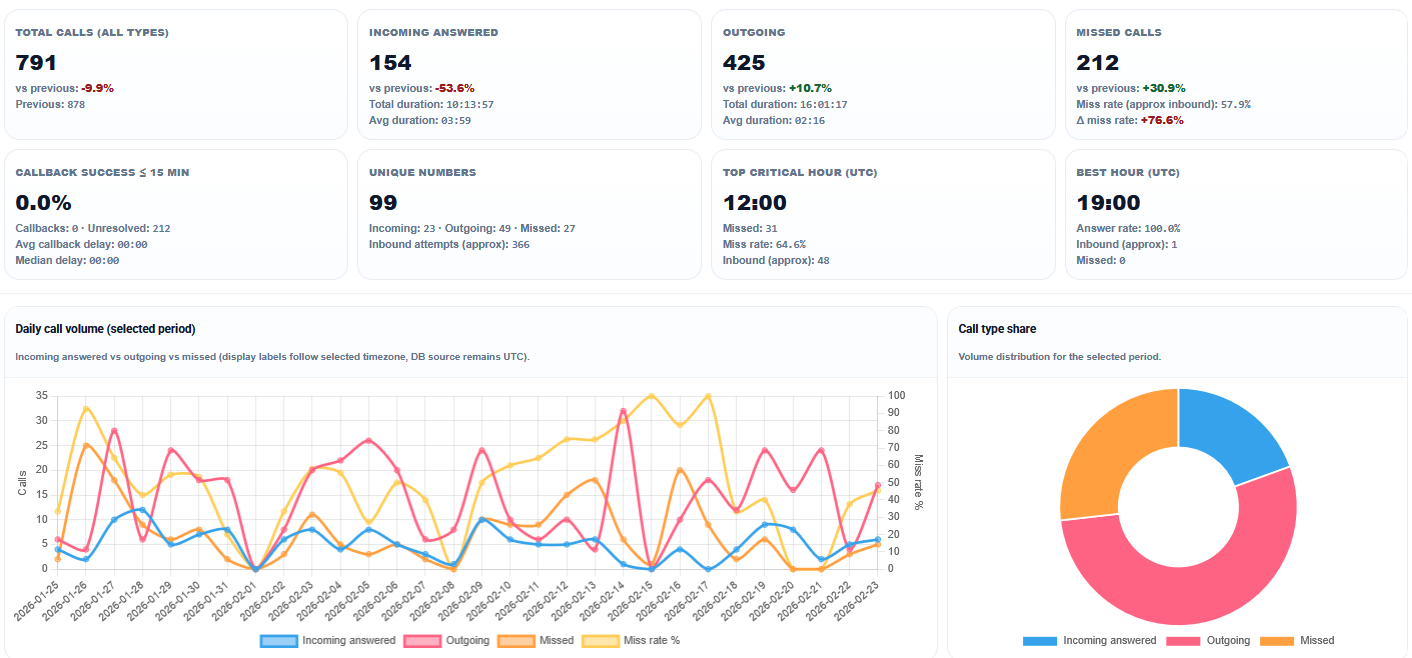
A Complete Call Management System Connected to Your Mobile Phone
Once your phone is connected to SMSMobileAPI, your call activity can be synchronized
and made available through your web dashboard and API endpoints.
This allows your business to track, analyze, export, and automate call-related workflows
without manually checking the phone every time.
The goal is simple: one central view for all call events.
Missed Calls Management
Automatically retrieve missed calls from your mobile phone and centralize them in your dashboard. Search, filter, report, export, and automate actions after a missed call.
Incoming Answered Calls (Non-Missed)
List incoming calls that were answered to get a full view of your inbound communication: number, contact name, date/time, duration, and other useful metadata.
Outgoing Calls Logs
Track outgoing calls made from the connected mobile and analyze call activity over time for sales, follow-up, and performance monitoring.
Practical Use Cases (Examples)
Here are concrete examples of how businesses and teams can use SMSMobileAPI Call Management in real life:
Sales Follow-Up Tracking
Log all incoming answered and outgoing calls to measure sales activity, track follow-ups, and export call data for reporting or CRM reconciliation.
Customer Support Visibility
Monitor missed calls to avoid lost requests and use the dashboard to identify busy periods, response gaps, and callback priorities.
Manager Reporting & KPIs
Use dashboard statistics and CSV exports to build weekly reports: total calls, missed calls, inbound/outbound trends, and team communication performance.
Automation via API
Retrieve call logs via API and trigger workflows: create CRM tasks after missed calls, open tickets, or send internal notifications.
On-Call / Emergency Teams
Keep a reliable history of missed, received, and outgoing calls for coordination, audits, and service continuity during busy periods.
Audit & History Archive
Maintain structured call logs in the dashboard and export them regularly as CSV for internal records, analysis, and historical traceability.
Dashboard Logs, Search and Filters
Browse your call history with keyword search (number, contact name, etc.)
and date range filters to quickly find what you need.
Separate views for missed calls, incoming answered calls, and outgoing calls make navigation easier.
Advanced Stats, Reports and CSV Export
Go beyond logs with advanced call statistics, reporting tools, and CSV export. Analyze communication activity and reuse the data in your own tools or internal reports.
Everything Is API-Connected
SMSMobileAPI Call Management is built API-first.
Your mobile phone remains the source of truth, and once synchronized,
your call logs become instantly usable via API in your CRM, internal tools, and automations.
GET https://api.smsmobileapi.com/call/missed/list/
GET https://api.smsmobileapi.com/call/incoming/
GET https://api.smsmobileapi.com/call/outgoing/
Typical automations you can build:
- Create CRM activities automatically after each call
- Generate callback tasks after missed calls
- Feed BI/reporting tools with API/CSV-ready call data
- Build internal dashboards for call activity monitoring
- Trigger alerts based on call volume or specific patterns
Want details for each endpoint? Missed · Incoming · Outgoing
Learn More About Each Call Feature
This page gives the global overview. For more details, screenshots and examples, visit the dedicated feature pages:
Centralize and Analyze All Your Mobile Call Activity
Connect your phone, access your dashboard, and turn call logs into actionable business data with SMSMobileAPI.
One ecosystem: mobile app + dashboard + API.

Call synchronization features are available via the Android app.
Create your dashboard account and connect your mobile phone.
FAQ – SMSMobileAPI Call Management
What call types can SMSMobileAPI manage?
SMSMobileAPI can centralize missed calls, incoming answered calls, and outgoing calls from your connected mobile phone.
Can I access call logs through an API?
Yes. SMSMobileAPI provides API access so your apps and automations can retrieve and process call logs.
Can I export call data?
Yes. You can generate reports and export call data as CSV.
Is everything visible in the dashboard?
Yes. SMSMobileAPI includes a dashboard with logs, filters, search tools, and advanced statistics.
 English
  French
  German
  Spanish
  Portuguese
  Russian
  Finnish
  Japanese
  Chinese
  Vietnamese
  Dutch
Dutch  Greek
Greek  Arabic
  Danish
  Italian
  Ukrainian